
Smart Home Security Systems in Dubai Complete Guidance
Installing reliable smart home security systems is essential for protecting modern properties in Dubai. A modern home can do much more than control lights and air conditioning. With the right technology, homeowners can monitor doors, windows, entrances, cameras, motion, and other security devices from a smartphone—even when they are away from the property.
This is where Smart Home Security Systems come into the picture.
Unlike traditional security arrangements that often operate as separate devices, a smart security setup can connect cameras, sensors, smart locks, alarms, and mobile applications into a more coordinated system. Some systems can also integrate security with lighting, access control, and other smart-home functions.
For homeowners in Dubai, this can be particularly useful for villas, apartments, townhouses, and larger residential properties. However, choosing the right system requires more than simply buying a few cameras.
You need to consider the property’s layout, internet connection, power supply, privacy, installation requirements, maintenance, and the type of security you actually need.
This guide explains Smart Home Security Systems, how they work, the main devices involved, Dubai-specific considerations, installation, pricing, advantages and limitations, and how to choose an appropriate setup.
What Are Smart Home Security Systems?
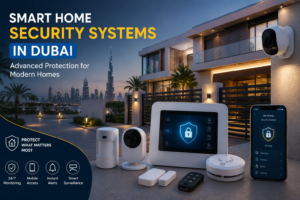
A smart home security system is a connected collection of devices designed to help monitor and protect a property.
Depending on the setup, it can include:
- Security cameras
- Video doorbells
- Smart locks
- Door and window sensors
- Motion sensors
- Alarm systems
- Smart lighting
- Indoor and outdoor surveillance
- Mobile applications
- Remote monitoring
- Central hubs or control panels
Instead of operating each device independently, compatible equipment can communicate through a network or smart-home platform.
For example, a motion sensor could detect movement and trigger an alert on your phone. A camera could simultaneously record the event, while smart lighting could be configured to turn on.
The exact capabilities depend on the equipment and software selected.
How Does a Smart Home Security System Work?
A typical system combines sensors, cameras, connectivity, software, and alerts.
For example:
Sensor detects activity → System processes the event → Camera records → App sends notification → Homeowner reviews the event
Some systems also support automated actions.
For instance, a door sensor may trigger an alert when the homeowner is away, while a smart lock can provide controlled access without requiring a traditional key.
Dubai Police also operates an official Smart Home Security service with 24/7 monitoring and connected home-security equipment, demonstrating how connected security can extend beyond basic standalone devices.
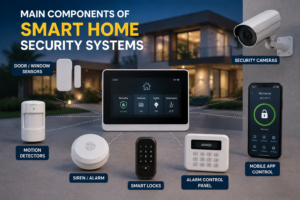
Main Components of Smart Home Security Systems
A smart security system does not necessarily require every available device.
The right combination depends on the property and security requirements.
1. Smart Security Cameras
Cameras are among the most recognizable parts of a smart security setup.
Modern cameras can provide features such as:
- HD or higher-resolution video
- Night vision
- Motion detection
- Two-way audio
- Mobile viewing
- Recording
- Person detection
- Activity notifications
Indoor cameras can monitor selected areas inside the property, while outdoor cameras can cover entrances, gardens, driveways, gates, and other external areas.
However, camera placement should be carefully planned to avoid unnecessary privacy concerns.
2. Smart Video Doorbells
A smart doorbell combines a doorbell with a camera and communication system.
Depending on the model, homeowners may be able to:
- See who is at the door
- Receive notifications
- Speak through the doorbell
- Record activity
- Monitor deliveries
This can be particularly convenient for homeowners who frequently receive deliveries or want to check visitors remotely.
3. Smart Locks
Smart locks can provide keyless or electronically controlled access.
Depending on the product, access may be provided through:
- PIN codes
- Mobile applications
- Fingerprints
- NFC or cards
- Temporary access codes
- Traditional keys as a backup
A smart lock can also be useful when homeowners need to give temporary access to family members, cleaners, maintenance workers, or guests.
However, the lock must be compatible with the existing door and installed correctly.
4. Door and Window Sensors
These small devices can detect whether a door or window is open or closed.
They are particularly useful for:
- Main entrances
- Balcony doors
- Ground-floor windows
- Garage access
- Villa perimeter doors
If a sensor detects unexpected activity while the system is armed, it can trigger an alert depending on the configuration.
5. Motion Sensors
Motion sensors can identify movement within selected areas.
They can be useful in:
- Hallways
- Entry areas
- Living rooms
- Garages
- Storage spaces
- Selected outdoor zones
However, sensor placement matters.
Incorrect positioning can result in unnecessary alerts caused by pets, moving curtains, sunlight, or other environmental factors.
Smart Home Security Pricing in Dubai
The cost of Smart Home Security Systems in Dubai can vary considerably.
A simple setup with a few cameras or a smart lock is very different from a complete villa system with multiple cameras, sensors, access control, automation, and professional installation.
Current Dubai market guides place basic apartment CCTV packages around AED 1,500–3,500 and villa systems around AED 4,000–15,000+, while broader smart-home packages can range from a few thousand dirhams to significantly more depending on the scope.
Indicative Security System Costs
| Security Setup | Approximate Cost in Dubai |
|---|---|
| Basic smart security | AED 2,500–5,000+ |
| Apartment security setup | AED 3,000–8,000+ |
| Mid-range villa security | AED 6,000–15,000+ |
| Advanced villa security | AED 15,000–30,000+ |
| Large integrated smart-home security | AED 30,000+ |
These are planning ranges rather than fixed quotations. Equipment selection, wiring, storage, installation complexity, number of zones, and integration can substantially change the final price.
Smart Security Device Price Guide
| Device | Indicative Price Range |
|---|---|
| Smart video doorbell | AED 400–1,200+ |
| Smart door lock | AED 700–2,500+ |
| Motion sensor/alarm device | AED 500–1,500+ |
| Security camera | Varies by specification |
| Multi-camera CCTV system | AED 1,500–15,000+ |
| Professional installation | Depends on project scope |
Current Dubai market guides report similar ranges for smart locks, video doorbells, and motion/security devices.
The important point is that hardware cost is only one part of the project.
Installation, wiring, storage, networking, configuration, and future maintenance can also affect the total cost.
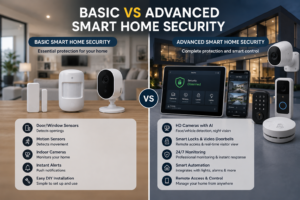
Basic vs Advanced Smart Home Security
Not every homeowner needs an expensive system.
| Feature | Basic Setup | Mid-Range Setup | Advanced Setup |
|---|---|---|---|
| Cameras | 1–3 | 3–6 | 6+ |
| Doorbell | Optional | Usually included | Included |
| Smart lock | Optional | Included | Multiple access points |
| Sensors | Basic | Multiple zones | Comprehensive |
| Mobile alerts | Yes | Yes | Yes |
| Recording | Limited/local | Local/cloud | Advanced storage |
| Automation | Limited | Moderate | Extensive |
| Professional installation | Optional | Recommended | Recommended |
A smaller apartment might only require a doorbell, smart lock, and a few cameras.
A large villa may require perimeter coverage, gate monitoring, multiple sensors, smart locks, alarms, and integrated controls.
Traditional Home Security vs Smart Home Security
Traditional security systems can still provide useful protection. The difference is mainly in connectivity, automation, and remote control.
| Traditional Security | Smart Home Security |
|---|---|
| Standalone devices | Connected devices |
| Limited remote access | Mobile monitoring |
| Basic alarms | Intelligent alerts |
| Traditional locks | Smart access options |
| Separate cameras | Integrated surveillance |
| Limited automation | Automated actions |
| Manual monitoring | Remote notifications |
However, smart does not automatically mean better.
A poorly designed smart system can still have weak coverage, unreliable connectivity, or inadequate maintenance.
The objective should be to build a reliable security system, not simply the most technologically advanced one.
Smart Home Security for Villas vs Apartments
Property type can significantly influence security planning.
Villa Security
A villa may require protection for:
- Main entrance
- Garage
- Garden
- Side gates
- Backyard
- Boundary walls
- Multiple floors
- Outdoor equipment
Consequently, villas often need more cameras and sensors than apartments.
Apartment Security
Apartment owners may focus primarily on:
- Main entrance
- Door lock
- Video doorbell
- Indoor camera
- Balcony access
- Selected windows
Building management rules and permissions may also affect what can be installed.
Therefore, apartment security should be planned around the building’s existing infrastructure and policies.
Important Dubai Considerations
Dubai homeowners should consider several practical factors before installing a smart security system.
Climate
Outdoor equipment must be suitable for the local environment.
Cameras and other external devices should be selected and installed with exposure to heat, dust, humidity, and sunlight in mind.
Internet Connectivity
Many smart devices depend on Wi-Fi or another network connection.
A weak connection can cause delays, dropped feeds, or unreliable notifications.
Power Supply
Consider what happens if the property’s electricity supply is interrupted.
Depending on the system, backup power may be appropriate for important equipment such as networking hardware, recording equipment, or alarms.
Building and Community Requirements
Apartment buildings and managed communities may have their own installation requirements.
Before installing external cameras, locks, or other equipment, homeowners should confirm applicable building or community permissions.
Privacy
Security cameras should be positioned responsibly and should not unnecessarily monitor areas belonging to neighbors or other private spaces.
Smart Home Security Installation Process
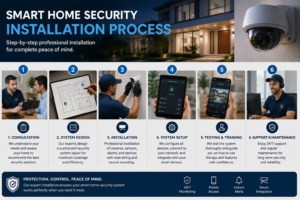
Professional installation generally follows several stages.
Step 1: Security Assessment
The property is reviewed to identify entrances, vulnerable areas, blind spots, and important monitoring zones.
Step 2: System Planning
The appropriate combination of cameras, sensors, locks, alarms, and other devices is selected.
Step 3: Device Placement
Camera and sensor positions are planned for useful coverage while avoiding unnecessary privacy concerns.
Step 4: Electrical and Network Planning
Power requirements, Wi-Fi coverage, Ethernet connections, and cable routes are reviewed.
Step 5: Installation
Devices are mounted, wired, configured, and connected.
Step 6: App and Remote Access Setup
The homeowner’s mobile application and authorized users are configured.
Step 7: Testing
Cameras, sensors, alarms, locks, notifications, and recording functions are tested.
Step 8: Handover
The homeowner receives instructions on operating the system, managing users, reviewing recordings, and handling basic troubleshooting.
Wired vs Wireless Smart Security Systems
Both approaches have advantages.
Wireless Systems
Wireless equipment can be easier to install, particularly in finished properties.
Advantages include:
- Less visible cabling
- Faster installation
- Easier expansion
- Suitable for many apartments and rented properties
However, wireless systems depend more heavily on reliable connectivity and device power.
Wired Systems
Wired systems can be particularly attractive during new construction or major renovation.
Advantages include:
- Stable connections
- Reliable continuous power
- Suitable for larger installations
- Better long-term infrastructure
For a villa undergoing renovation, integrating security wiring before walls and ceilings are finished can be more practical than adding extensive cabling afterward.
Advantages of Smart Home Security Systems
Remote Monitoring
Homeowners can check selected cameras and receive alerts while away.
Greater Convenience
Smart locks and mobile controls can reduce the need for traditional keys.
Faster Awareness
Notifications can inform homeowners about certain events soon after they occur.
Integration
Security devices can potentially work with lighting, access control, and other smart-home systems.
Scalability
A system can often start small and expand as requirements change.
Limitations of Smart Home Security
Smart security is useful, but it is not perfect.
Internet Dependence
Some devices depend on internet or Wi-Fi connectivity.
Power Dependence
Certain equipment requires continuous power.
Privacy Risks
Connected cameras and devices create additional privacy considerations.
Maintenance
Cameras, sensors, batteries, software, networks, and storage systems require ongoing attention.
False Alerts
Poorly configured sensors can generate unnecessary notifications.
Therefore, smart security should be viewed as a security layer rather than an absolute guarantee of protection.
Smart Security and Privacy
The more connected devices a home has, the more important digital security becomes.
Homeowners should:
- Use strong unique passwords
- Enable two-factor authentication where available
- Keep device software updated
- Secure the home Wi-Fi network
- Remove old users
- Review app permissions
- Use reputable equipment
- Change default credentials
- Protect recorded footage
Security is therefore both physical and digital.
A high-quality camera is of limited value if the account controlling it is poorly protected.
Research into smart-home security has also highlighted that connected devices can introduce their own cybersecurity risks, making authentication and system-level security important considerations.
Smart Home Security Maintenance
Installing the system is not the end of the process.
Regular maintenance can include:
- Camera cleaning
- Checking connections
- Testing sensors
- Checking batteries
- Reviewing storage
- Updating software
- Testing alarms
- Checking Wi-Fi coverage
- Reviewing authorized users
Outdoor cameras should receive particular attention because dust and environmental exposure can affect image quality.
Regular maintenance can also help identify failing equipment before it becomes a problem.
How to Choose the Right Smart Home Security System
Before purchasing anything, ask yourself:
What do I actually need to protect?
Start by identifying:
- Main entry points
- Outdoor areas
- Ground-floor windows
- Garage access
- High-value or sensitive areas
- Areas requiring remote monitoring
Then decide which devices are genuinely useful.
There is little benefit in installing ten cameras if several of them provide overlapping views while important areas remain uncovered.
Good security planning is about coverage, reliability, usability, and appropriate technology.
Related Electrical and Home Services
Smart security often depends on the property’s underlying electrical and network infrastructure.
For example, a larger installation may require:
- New electrical points
- Cable routing
- Network connections
- Additional power supplies
- Wall modifications
- Ceiling access
- Maintenance
This is why security installation can sometimes overlap with broader property improvement work.
Sahab Tech Group LLC provides related services including electrical work, smart-home solutions, building maintenance, HVAC, plumbing, civil work, waterproofing, and renovation.
Our previous article on Smart Home Upgrades That Save Money also explains how connected technology can be integrated into a broader smart-home strategy.
Similarly, our Smart Home Electrical Upgrades guide covers the importance of electrical infrastructure when modernizing a property.
Conclusion
Smart Home Security Systems can provide homeowners with more visibility, convenience, and control over their properties.
However, the best system is not necessarily the one with the largest number of devices.
A good setup begins with understanding the property.
For an apartment, a smart lock, video doorbell, and carefully positioned camera may be enough. For a villa, the requirements could include perimeter cameras, multiple sensors, gate monitoring, smart locks, alarms, and integrated control.
Dubai homeowners should also consider climate, connectivity, power, privacy, building requirements, maintenance, and future expansion before making a decision.
Most importantly, security should be approached as a complete system rather than a collection of individual gadgets.
Why Choose Sahab Tech Group LLC?
If you are planning to upgrade your home with Smart Home Security Systems, the installation should be approached with both technology and the property’s existing infrastructure in mind.
Sahab Tech Group LLC provides residential, commercial, and industrial property services in Dubai, including:
- Smart home solutions
- Electrical services
- Building maintenance
- HVAC
- Plumbing
- Civil work
- Waterproofing
- Renovation
With more than 15 years of experience, the team can help assess the property, identify relevant requirements, and coordinate related technical work where needed.
A professional assessment can also help determine whether your property requires additional electrical points, wiring, renovation work, or maintenance before security equipment is installed.
Contact Sahab Tech Group LLC today to discuss your smart home security requirements and request a professional assessment or quotation.
Call Us: +971 56 756 7243
Email: info@sahabtechgroup.com
Website: Sahab Tech Group LLC
Location: Dubai, UAE
Frequently Asked Questions
1. What are Smart Home Security Systems?
They are connected security solutions that can combine cameras, sensors, smart locks, alarms, and mobile applications to monitor and manage different aspects of home security.
2. How much do Smart Home Security Systems cost in Dubai?
Basic setups can start at a few thousand dirhams, while larger villa installations can cost AED 15,000–30,000 or more depending on equipment, coverage, wiring, installation, and integration.
3. Are smart security systems worth it?
They can be worthwhile for homeowners who value remote monitoring, connected alerts, smart access, and integration. However, the system should be selected according to actual security requirements rather than technology alone.
4. Are wired or wireless security systems better?
Neither is universally better. Wireless systems can be convenient for finished properties, while wired systems can provide strong infrastructure for larger homes and renovation projects.
5. Do smart security systems require maintenance?
Yes. Cameras, sensors, batteries, software, networks, storage, and other equipment should be checked and maintained periodically to keep the system reliable.